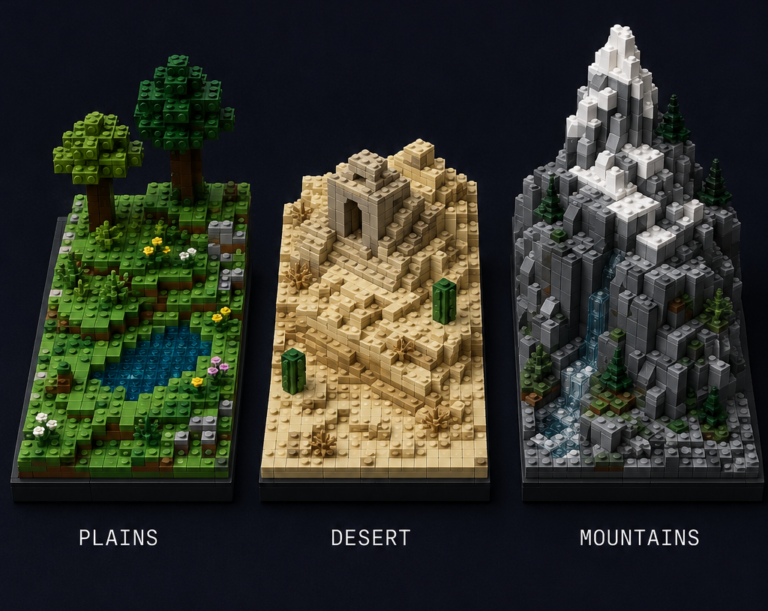
Transform your MOCs from toy-like to museum-quality displays with these expert texturing methods
The leap from building functional LEGO models to creating photorealistic masterpieces often comes down to one critical element: texture. While anyone can stack bricks into recognizable shapes, the techniques that separate amateur builders from those whose work gets featured in exhibitions and magazines are all about surface treatment, weathering effects, and material simulation.
Most adult builders hit a plateau where their models look distinctly “LEGO-like” rather than realistic representations of actual objects. The solution isn’t more pieces or bigger builds – it’s mastering the subtle art of texture manipulation. Whether you’re recreating historical architecture, designing original sci-fi vehicles, or building detailed dioramas, these advanced techniques will transform how your models are perceived.
“The difference between a good MOC and a museum-quality display piece often comes down to texture mastery.”
Today we’ll explore three fundamental approaches to realistic LEGO texturing: creating natural color gradients for weathering effects, strategically mixing smooth and textured pieces, and replicating specific surface materials like brick, stone, and metal. Each technique builds on foundational LEGO color theory principles while pushing into advanced territory that most builders never explore.
Mastering Color Gradients for Weathering Effects
Understanding Natural Weathering Patterns
Real-world weathering follows predictable patterns that our eyes have evolved to recognize. Water damage typically starts at joints and flows downward, creating vertical streaks. Sun exposure fades colors unevenly, with protected areas retaining deeper hues. Wear patterns concentrate at contact points – door handles, steps, corners where people brush against surfaces.
The key to convincing weathering effects lies in studying these natural processes and translating them into LEGO color progressions. A weathered brick wall doesn’t fade uniformly; it shows concentrated damage around mortar joints, darker staining below window sills, and lighter wear on exposed corners. Your color choices need to tell this same story.
Consider a Victorian-era building facade. New bricks start as vibrant reddish brown, but decades of weather create a complex pattern: darker rust stains from metal fixtures, lighter patches where rain has washed surfaces clean, and greenish discoloration from copper gutters. This isn’t random – it follows the building’s architecture and exposure patterns.
The Gradient Technique Toolkit
Color Progression Mapping starts with identifying your base material color, then mapping realistic transition sequences. For rust effects, progression might flow from reddish brown (Element ID 192) through dark orange (Element ID 38) to bright orange (Element ID 106), finally reaching tan (Element ID 2) for the most weathered areas. Each step represents increasing oxidation levels.
LEGO Weathering Color Guide
Master realistic aging effects with these proven color progressions
Transform your MOCs from toy-like to museum-quality displays using these professional weathering color sequences. Each progression shows the natural aging process translated into LEGO color choices.
Iron & Steel Rust
Perfect for industrial builds, military vehicles, and aged infrastructure
Element #85
Element #192
Element #38
Element #106
Element #2
Stone & Masonry
Ideal for castles, ancient ruins, and architectural models
Element #86
Element #194
Element #199
Element #1
Wood Aging
Essential for medieval builds, ships, and rustic structures
Element #2
Element #69
Element #192
Element #308
Copper Patina
Perfect for roofing, statues, and maritime applications
Element #106
Element #308
Element #48
Element #141
Concrete & Cement
Modern urban builds, bunkers, and industrial structures
Element #9
Element #10
Element #11
Paint Degradation
Vehicles, buildings, and any painted surface aging
Element #23
Element #62
Element #1
Element #86
Pro Application Tips
🎯 Strategic Placement
Focus weathering around joints, edges, and areas where water naturally collects or flows
🔄 Gradual Transitions
Use 1×1 pieces to create smooth color blending between weathering stages
📐 Follow Physics
Rust flows downward, sun fading is uniform, wear happens at contact points
🎨 Less is More
Real weathering is often subtle – start light and build up gradually
📸 Use References
Study real weathering patterns in photographs for authentic results
🧪 Test First
Build small test sections to preview color combinations before committing
Color Reference Legend
Strategic Piece Placement determines where these color transitions occur. Rust doesn’t appear randomly – it concentrates around bolts, joints, and areas where water collects. In your LEGO model, place darker rust tones around connection points and technic pin holes, with lighter oxidation spreading outward in organic patterns.
Blending Methods create smooth transitions between color zones. The overlapping technique places lighter colors over darker base layers, allowing underlying hues to show through gaps between studs. Interlocking involves alternating colors in checkerboard or scattered patterns that the eye blends from viewing distance. Layering uses plates and tiles to create actual depth variations that enhance color transitions.
The most common mistake is creating harsh, linear transitions that look artificial. Real weathering creates soft, irregular boundaries. Use 1×1 pieces as transition elements, scattering them randomly rather than in neat rows or geometric patterns.
Practical Application Examples
Rust Effects work beautifully on industrial and military builds. Start with dark bluish gray base plates representing clean metal, then add scattered reddish brown 1×1 pieces around rivet locations. Layer dark orange pieces over these, followed by bright orange highlights. The effect suggests decades of maritime exposure or industrial use.
For advanced rust techniques, advanced LEGO building methods like SNOT (Studs Not On Top) construction allow you to orient textured pieces at angles that catch light differently, enhancing the weathered appearance.
Stone Weathering using gray progressions creates convincing ancient architecture effects. Begin with light bluish gray as your primary stone color, then add medium stone gray in recessed areas where water collects. Dark stone gray pieces simulate moss growth and deep staining, while white and tan elements suggest limestone deposits or newer repair work.
Wood Aging employs tan-to-brown progressions that simulate decades of sun exposure and moisture cycling. Start with tan base construction, add scattered reddish brown pieces for aged sections, and use dark brown for areas with the heaviest weathering – typically bottom plates and corners most exposed to the elements.
Strategic Mixing of Smooth and Textured Pieces
The Psychology of Surface Texture
Human vision interprets surface finish as material information before consciously recognizing shape or color. Smooth surfaces suggest manufactured precision, glass, or polished metals. Textured surfaces indicate natural materials, weathered objects, or intentionally rough finishes. This psychological response happens in milliseconds and powerfully influences how realistic your model appears.
The 80/20 rule applies perfectly to texture mixing: 80% of your surface should use one primary texture type, with 20% contrast texture for emphasis and interest. Too much texture variety creates visual chaos. Too little contrast looks flat and artificial.
When building architectural models, smooth pieces work for modern materials like glass, polished concrete, or painted surfaces. Textured elements represent brick, stone, wood grain, or weathered metals. The transition between these surface types needs careful handling to maintain realism.
Texture Contrast Techniques
Highlighting Focal Points uses smooth pieces to draw attention exactly where you want viewers to look. On a medieval castle build, rough stone walls benefit from smooth pieces representing wooden doors, metal reinforcements, or glass windows. The contrast makes these architectural details stand out while maintaining overall texture coherence.
Creating Depth through texture variation suggests layering and distance. Foreground elements use bold texture contrasts – rough stone against smooth metal, weathered wood against polished brass. Background elements use subtler texture variations that don’t compete for attention. This technique is essential for large dioramas or complex architectural models.
Material Simulation matches LEGO surface finish to real-world material properties. Modern building glass gets represented by transparent pieces with smooth frames. Industrial grating uses lattice elements or grille pieces. Concrete surfaces combine smooth plates with occasional textured pieces to suggest aggregate or weathering.
Advanced Mixing Strategies
Transitional Zones between different surface types require special attention. Where stone meets wood, real buildings show complex interfaces – wooden beams embedded in stone walls, metal flashing sealing joints, mortar filling gaps. Your LEGO version needs similar transition details using small pieces that bridge texture differences.
Scale Considerations affect texture choices dramatically. At minifigure scale, individual brick pieces can represent stone blocks. At microscale, those same pieces might represent entire building sections. Understanding your model’s scale helps determine appropriate texture granularity.
For inventory management, focus on collecting versatile textured elements: grille pieces work for industrial grating, ventilation covers, and decorative screens. Slope pieces with different surface finishes provide organic transition options. Essential building tools can help you identify which textured elements offer the most building flexibility.
Creating Realistic Surface Materials
Brick and Masonry Surfaces
Classic Brick Patterns extend far beyond basic stacking. Running bond (each course offset by half a brick length) creates the most common pattern, but Flemish bond, English bond, and herringbone patterns add visual interest and historical accuracy. Each pattern requires different LEGO piece arrangements and planning approaches.
Mortar Line Simulation uses light gray pieces effectively when placed with restraint. Real mortar lines are thin – typically 1/8 to 1/4 inch thick. In LEGO terms, this means using plates or tiles as mortar representation, not full-height bricks. Light bluish gray plates between reddish brown brick courses create convincing masonry without overwhelming the overall appearance.
Damage and Repair adds historical authenticity to brick structures. Missing bricks get replaced with differently colored pieces suggesting repairs made over time. Cracked mortar shows as irregular gaps between pieces. Spalling (surface damage from freeze-thaw cycles) appears as lighter colored pieces mixed randomly into predominantly darker brick sections.
For complex masonry projects, understanding standard brick building techniques provides the foundation for these advanced applications.
Stone and Rock Textures
Natural Stone Variation requires mixing multiple gray tones within the same structure. Real stone buildings use blocks from different quarry sections, creating subtle color variations. Your LEGO version needs similar variety – predominantly light bluish gray with scattered medium stone gray and dark stone gray pieces placed randomly throughout.
Carved vs. Natural Stone demands different approaches. Carved architectural elements use smooth pieces to suggest precise tooling and crisp edges. Natural stone walls incorporate more textured pieces, irregular shapes, and varied orientations to simulate rough-cut or fieldstone construction.
Rock Face Techniques for cliff faces or natural stone walls use irregular piece placement and multiple orientations. SNOT building techniques become essential for creating realistic rock textures, allowing pieces to project at various angles rather than maintaining uniform stud-up orientation.
Mineral Streaking adds subtle realism through strategic color placement. Many sedimentary rocks show banding or mineral deposits that create linear patterns. In LEGO terms, this means incorporating thin lines of contrasting colors – tan streaks through gray limestone, or darker bands through lighter sandstone representations.
Metal Surface Replication
Oxidation Patterns follow predictable rules based on metal type and environmental exposure. Iron and steel rust in reddish tones, copper develops green patina, aluminum creates white oxidation powder. Understanding these natural processes helps you choose appropriate LEGO color progressions for different metal types.
Reflective Surfaces require careful use of chrome and metallic elements. Real polished metal reflects surrounding colors, but LEGO chrome pieces reflect everything equally. Use them sparingly for maximum impact – accent details rather than large surface areas. Pearl silver and pearl gold pieces often provide more subtle metallic effects for larger areas.
Industrial Textures like grating, mesh, and corrugated patterns have direct LEGO equivalents. Grille pieces simulate expanded metal or perforated sheets. Lattice elements work for chain-link fencing or industrial screening. Textured slope pieces can represent corrugated metal siding when used consistently across large areas.
Age Indicators like scratches, dents, and wear marks require subtle implementation. Missing or displaced pieces can suggest impact damage. Contrasting colors in small quantities indicate wear patterns or maintenance marks. The key is restraint – real wear patterns are often surprisingly subtle compared to what builders think looks realistic.
Advanced Implementation Tips
Planning and Design Process
Sketching Texture Patterns before building saves time and pieces. Draw your intended weathering patterns on paper, marking where different colors will concentrate. This planning phase reveals potential problems – like color transitions that might look too harsh or texture changes that don’t follow logical patterns.
Color Inventory Management for large textured projects requires strategic piece accumulation. Track which colors you need in quantity, focusing on transition tones that create smooth weathering effects. Many texture techniques depend on having enough intermediate colors to avoid harsh jumps between light and dark tones.
Photography Reference Gathering provides essential guidance for realistic texture work. Study actual weathering patterns on buildings, vehicles, and structures similar to what you’re modeling. Note how wear patterns follow logical paths, how colors transition gradually, and where texture changes occur naturally.
Digital Planning Tools like Stud.io or LEGO Digital Designer help test color combinations and texture patterns before committing physical pieces. These tools let you experiment with weathering effects and see how different color combinations work together from various viewing angles.
Troubleshooting Common Issues
Fixing Harsh Color Transitions often requires adding intermediate tones you didn’t originally plan for. If your rust effect jumps too abruptly from reddish brown to orange, try adding dark orange pieces as transition elements. Scattered 1×1 pieces work perfectly for this adjustment without requiring major reconstruction.
Dealing with Limited Color Availability challenges many builders working with realistic textures. When specific colors aren’t available, study the LEGO color guide to identify acceptable substitutes that maintain your intended effect. Sometimes slightly different hues work better than expected.
Maintaining Structural Integrity while adding texture details requires balancing aesthetics with engineering. Textured surfaces often use more small pieces, which can weaken overall structure. Plan your internal framework carefully, ensuring that decorative surface elements don’t compromise the model’s stability.
Budget-Friendly Alternatives help achieve texture effects without expensive rare pieces. Common pieces in creative orientations often work as well as specialized textured elements. A grille piece might cost several dollars, but creative arrangement of standard pieces can achieve similar visual effects for much less investment.
Mastering Your Texture Toolkit
These advanced texture techniques represent the difference between good LEGO building and exceptional artistry. Color gradients transform static models into weathered, lived-in objects with apparent history. Strategic texture mixing creates visual depth and material authenticity that makes viewers forget they’re looking at plastic bricks. Surface material simulation lets you recreate specific architectural styles, historical periods, or industrial environments with convincing accuracy.
The key to mastering these techniques lies in observation and practice. Study real-world weathering patterns, experiment with color transitions on small test builds, and gradually incorporate these methods into larger projects. Start with simple weathering effects on existing models, then work toward more complex texture combinations as your skills develop.
Remember that realistic texture work is often about restraint rather than excess. Real weathering patterns are frequently more subtle than what initially seems necessary. Trust the process, build test sections to evaluate color combinations, and don’t hesitate to adjust your approach as the model develops.
What surface texture has been most challenging for you to recreate in LEGO? Share your texture experiments and discoveries in the comments below – your insights might solve someone else’s building puzzle.
Ready to dive deeper into advanced LEGO techniques? Explore our LEGO glossary for technical terminology, or check out our guide to essential building tools that make texture work easier and more precise.